Matched on two keys
Product SKU from PrestaShop against WooCommerce, and the PrestaShop image ID still sitting at the front of each migrated filename. 1835-scaled.jpg is image 1835.
/ Case study · Ecommerce migration and operations
A bedroom decor store moved from PrestaShop to WordPress and WooCommerce. The files arrived. The meaning did not: which image belonged to which product, and to which colour or finish, was gone. This is how that relationship was rebuilt from the old database, and everything the catalogue needed afterwards.
What this page is: the work is summarised from two internal procedure documents written while doing it, so the same steps can be repeated on the next catalogue rather than remembered. Client data is kept out; what is shown is method, figures and the public storefront.
/ In short
Product SKU from PrestaShop against WooCommerce, and the PrestaShop image ID still sitting at the front of each migrated filename. 1835-scaled.jpg is image 1835.
One SELECT against the PrestaShop database recovered the historical link between image, product and combination. No UPDATE, DELETE, INSERT, ALTER or DROP anywhere in it.
Full database and /wp-content/uploads before any bulk import, then a two-product test file checked by hand before the full run.
Not by SKU. A migrated catalogue carries empty and duplicate SKUs, and an import keyed on those writes the right data to the wrong product.
The swatch plugin gives up past a threshold. That threshold was raised for that single product rather than globally, so every other product keeps the safe default.
Every bulk change lived in a snippet: scoped, reversible, and deactivated once the one-shot pass had finished. The theme was left alone.
/ 01 · The problem
The products and the images were already in WordPress and already attached to WooCommerce. What had not survived was the relationship: PrestaShop knew that a given image belonged to a given combination of size, colour and finish, and WooCommerce knew only that a file existed. Titles and ALT text were generic or empty, filenames were bare numbers, and several pre-migration demo products were still in the catalogue polluting any bulk operation.
So the job was not to migrate again. It was to recover the old meaning and write it back over the new store, without touching a single price, stock level, attribute or variation.
/ 02 · The cross-reference
Each system held a different part of the answer. The work was joining them into a single import file that a human could audit before anything was written.
| Source | What it contributes |
|---|---|
| WP All Export | The current structure in WordPress: product ID, SKU, type, parent, and for every image its ID, URL, filename, path, title, ALT and caption. |
| WooCommerce export | Product-level data and attributes, used to confirm the product identity before anything is matched. |
| PrestaShop SQL | The historical relationship: image ID, position, cover flag, legend, combination ID and the attribute pairs behind it. |
| Filename prefix | The PrestaShop image ID survived the migration inside the filename, which is what makes an image-level match possible at all. |
Result of the cross-reference: 773 images matched, 740 with a clear correspondence, 33 flagged for manual review, and none left unmatched. Twenty-three pre-migration demo and duplicate records were excluded by a rule, not by hand: no SKU, so out of scope.
/ 03 · Safety protocol
A bulk import on a live store is a one-way door if you get it wrong. These were fixed in advance so that no decision had to be made under pressure.
| Rule | Why |
|---|---|
| Back up first | Full database plus /wp-content/uploads before any bulk operation. |
| Two products first | Run the import with a two-product CSV, check the result by hand, only then run the full file. |
| Key on Product ID | SKUs in a migrated catalogue can be empty or duplicated. The WordPress product ID cannot. |
| Images only | Update image title and ALT. Never product title, content, price, stock, attributes, variations, taxonomies or custom fields. |
| Never delete | Any option that removes or alters products missing from the CSV stays off. |
| Rename last | Physical filenames are only changed once titles and ALT text are confirmed correct. |
/ 04 · After the migration
With the metadata correct, the rest was the storefront: making a variable-product catalogue behave like a shop rather than like a database export.
| Change | What it took |
|---|---|
| Bulk file renaming | Media File Renamer generates the physical filename from the attachment title, with titles and ALT left untouched. Verified across product galleries, thumbnails and Elementor pages. |
| Stock simplified | Exact quantities hidden in the storefront, and 20 units written to every variation rather than only to the parent product. |
| Size before colour | Attribute order inverted across the catalogue with a one-shot snippet, run in batches from the products list, then deactivated. |
| A default size | A default measurement preselected on every compatible variable product, so the page opens on a buyable state. |
| 242 variations | One product exceeded the swatch plugin threshold. The limit was raised for that product ID alone, transients cleared, and another variable product checked to confirm the filter had not leaked. |
| Labelled swatches | Label position enabled so each group reads as Size, Front colour and Back colour instead of three anonymous rows of squares. |
| Catalogue hygiene | Duplicate records from the migration deleted, products reassigned to their correct categories, swatch colours completed, social links pointed at the real profiles. |

The shop the whole migration was rebuilt for, on WordPress and WooCommerce.
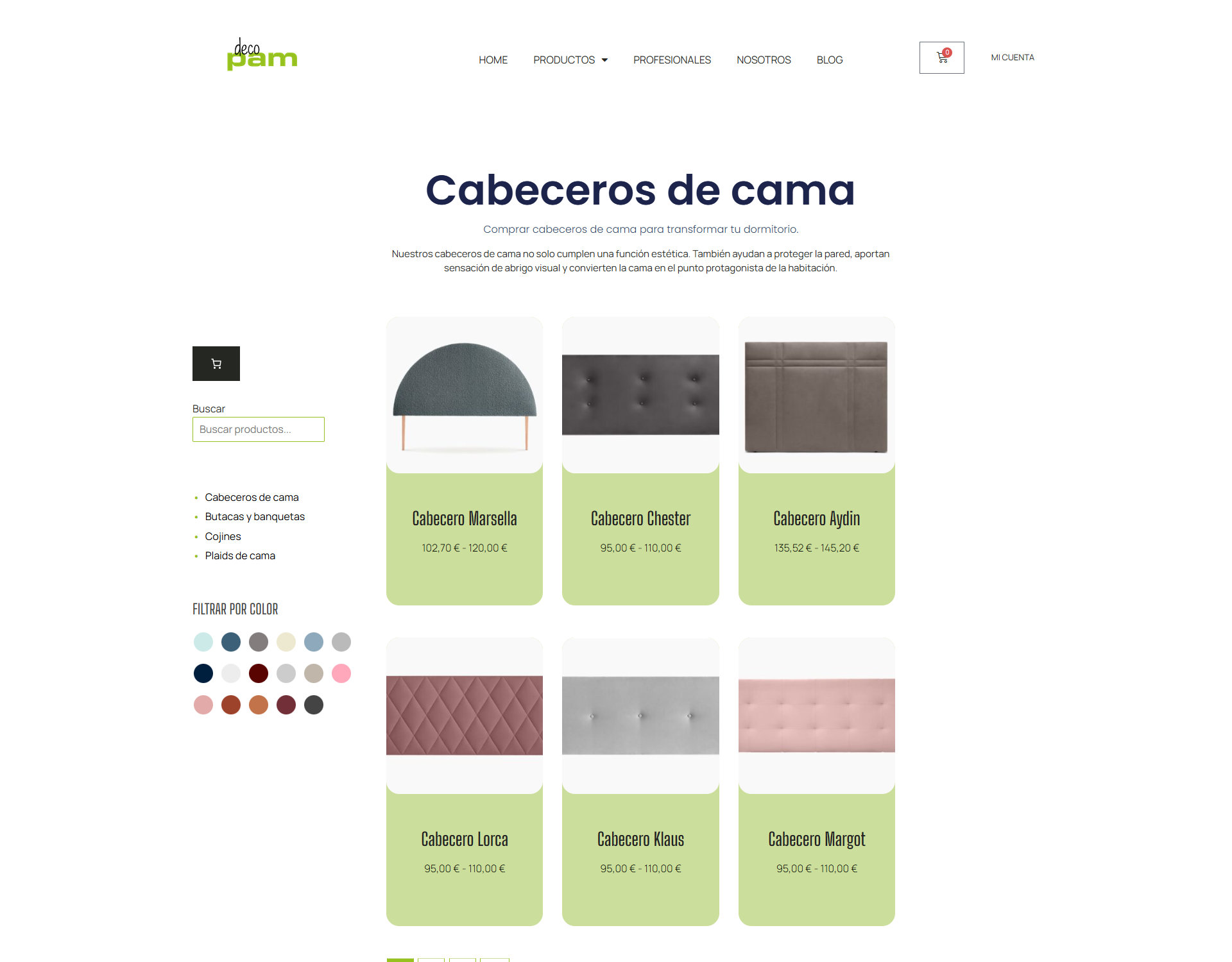
Products sitting in their correct category after the cleanup, and a colour filter fed by the same swatch attributes that were rebuilt on the product pages.
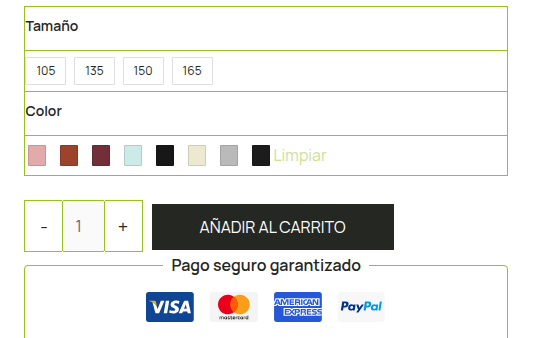
Each attribute group labelled, the measurement first, and a default already selected so the page opens on something you can actually buy.
/ 05 · What it proves
| Claim | Evidence |
|---|---|
| Data recovery, not guesswork | The image relationship was reconstructed from the source database with a read-only query, and the match rate is stated: 740 clear, 33 flagged, 0 unmatched. |
| Safe on a live store | Backups, a two-product dry run, ID-based identification and an images-only update scope. No price, stock or variation was written to. |
| Scoped fixes | The swatch threshold was raised for one product, not globally. The one-shot snippets were deactivated after their single run. |
| Repeatable | Both procedures are written down, including the SQL, the field mapping and an operational checklist, so the next catalogue does not start from zero. |
| Ownership, not tickets | Migration, metadata, catalogue, variations and storefront behaviour were one continuous job rather than a queue of separate requests. |
/ Next
Migrations are where a site is most likely to quietly break, and where the damage shows up months later. This one is documented so it can be repeated rather than remembered. If that is the kind of work you need, say hi.