First, what the site is for
Before proposing anything I asked what the site was for: information, sales, or both. Both. That pointed away from a redesign and towards the half that was broken.
/ Case study · Ecommerce data and tooling
An engine spare parts company asked for a new website. The site was fine. The shop was not: it listed 192 products out of more than a thousand, because every supplier sends its catalogue in a different format and none of them has an API. So instead of a redesign I built the missing piece: a tool that reads any supplier file, unifies it, classifies it and hands Shopify a file it can import.
What this page is: the client is kept anonymous, and so are its suppliers and brands. The figures come from running the tool on the full supplier catalogues. The code was written pair-programming with Claude, like the rest of this site: I decided what to build and checked every result against the data.
/ In short
Before proposing anything I asked what the site was for: information, sales, or both. Both. That pointed away from a redesign and towards the half that was broken.
The tool recognises a supplier file by its column headers. A new format is described once, saved as a profile, and recognised on its own from then on.
Categories, images, VAT and margins live in CSV files you can open in Excel. Adding a supplier or a category is configuration, not code.
The script that sets up the store only reports what it would do. It writes only when told to, never deletes, and never stores credentials.
Once products are live, the tool compares against the store and sends only price and cost changes. Status, texts and photos are left exactly as they are.
Every change was run against the full catalogue and compared product by product. One fix that looked obvious would have removed 840 products, so it was not made.
/ 01 · The problem
The brief was a new website. Looking at the existing one, it was not bad, so the useful question was what it was for. The answer was both: a company presentation and a shop. The presentation side worked. The shop listed 192 products when the catalogue runs to more than a thousand, and even those 192 had category errors and menu links that led nowhere.
The cause was upstream of the website. Each supplier sends prices and references in its own way: Excel sheets, CSV exports, PDF catalogues, each with different columns and names for the same thing. None offers an API. Putting a product in the shop meant copying it by hand from whichever file had it, which is why most products never got there.
The decision: keep the site and the platform, and fix the process that feeds the shop. A redesign would have been more visible and would have changed nothing about the 192.
/ 02 · The data
Before designing anything I put every supplier source through the same pipeline and counted what came out. The full supplier catalogues are far larger than what the shop will sell (around a thousand products to start with), which made them a good stress test.
Five sources together. Rows that are not engine parts are dropped, repeated parts are joined, and parts no source prices stay out.
| Measured on the full files | Result |
|---|---|
| Distinct products after merging every source | 37,948 |
| Ready for Shopify | 34,379 variants in 34,339 listings |
| Left out because no source gives a price | 3,569, listed in the report with the reason |
| Conflicts between sources | 0 (when two files disagree, the tool says which file and which row) |
| Products arriving with a photo, weight, barcode or lead time | 0 |
| Products arriving without a description | 36,514 |
What that meant: the tool could not just move data around. It had to supply what nobody sends, such as images and an availability message, and say clearly what is still missing rather than invent it.
/ 03 · The tool
A Python pipeline with a small local web interface on top. Files go in as they arrive; a Shopify import file and a quality report come out. It works the same with 200 products as with 37,948. There is no server and no database: everything runs on the computer of whoever uses it, starting from the files each time.
Excel, CSV or PDF. Finds the header row even under titles, skips headers repeated on every PDF page.
Matches the column headers against saved supplier profiles. A new format is described once in the interface.
Normalises references and prices, merges the same part across files and records every disagreement.
Translates names, assigns one of 15 engine systems, vehicle data, a generic image per part type and variants by size.
Shopify CSV, a master table with the source of every value, and an Excel report of what needs a human.
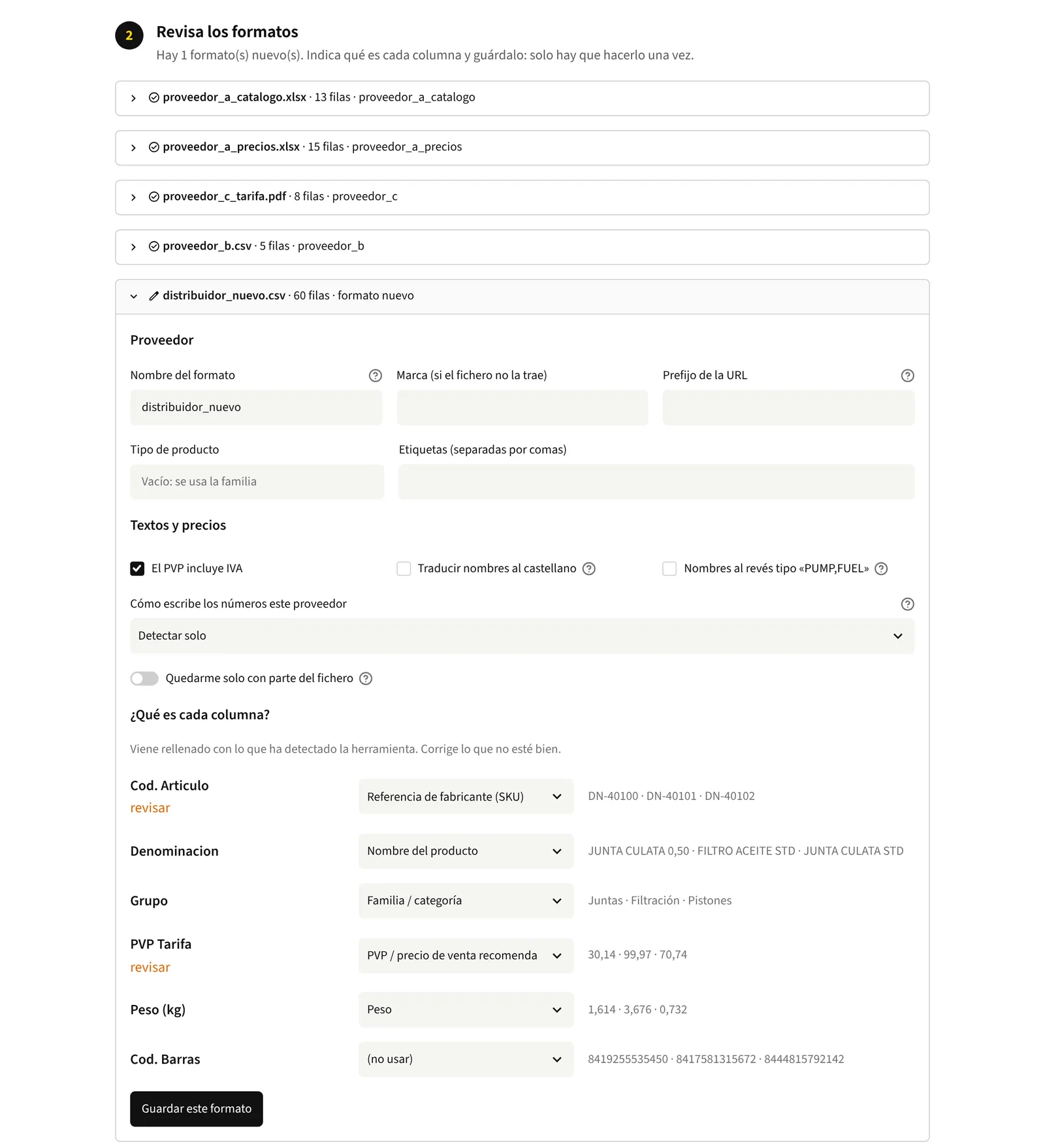
The first four files are recognised by their headers. The fifth is a new format: the tool proposes what each column is, flags what is worth checking and saves it for next time. The interface is in Spanish, like the people who use it.
| Piece | What it does |
|---|---|
| Supplier profiles | One small file per format: which column is the reference, which is the price, whether prices include VAT, how the supplier writes decimals. |
| Name rewriting | Catalogue names in English come as "NOUN,DETAIL". They are turned round and translated with a glossary of about 270 expressions, so "GASKET,EXHAUST MANIFOLD" becomes "Exhaust manifold gasket" in Spanish. |
| Engine systems | 15 systems that follow the categories the shop already had. Assigned by ordered rules in a CSV; 177 of 34,339 listings still fall into "Other". |
| Generic images | No supplier sends photos, so each part type gets a generic image, marked as indicative in its alt text: 22,211 listings covered. |
| Interface | Four steps in the browser, opened with a double click: upload, check the columns, choose what to generate, download. |
| Store setup script | Creates the custom fields, one automatic collection per engine system and the menu links, through the Shopify Admin GraphQL API. |
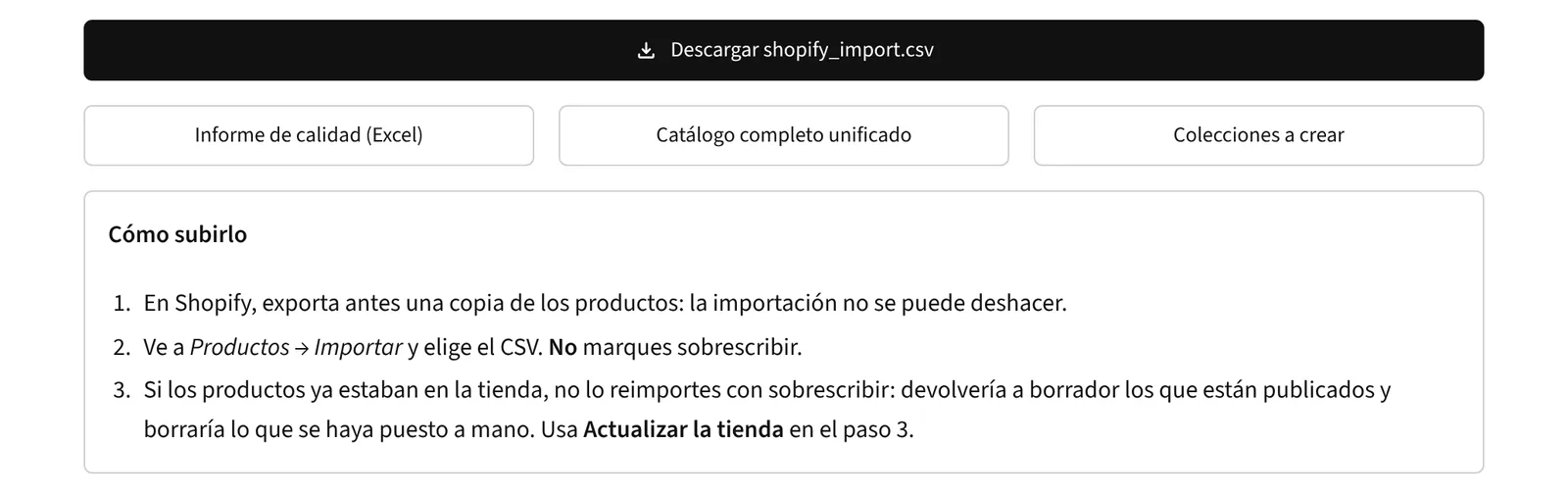
The Shopify CSV, the quality report in Excel, the unified catalogue and the collections to create, with the steps to import it without overwriting what is already there. Example data.
/ 04 · Decisions
The person using it day to day will not be me. That changed more decisions than any technical constraint did.
| Decision | Why |
|---|---|
| Availability on request | Without supplier APIs there is no reliable stock figure. Every product says "check availability" with the shop's phone number instead of showing an "in stock" nobody can guarantee. The field is already there for when real data exists. |
| Images by part type, not by name | Matching images on words in the name would add 3,100 more photos. I checked a sample: almost all were wrong, a pump cover showing a whole pump. The option exists, switched off. |
| Test on a sample first | A first import of around 33,000 products got stuck. Since then the tool can build a sample of any size spread across part families, and repeat exactly the same one to compare before and after. |
| A separate update mode | Re-importing everything with "overwrite" would set live products back to draft and blank anything filled in by hand. The update mode reads the store export, matches by SKU and sends only the columns that change. |
| Safe store setup | Dry run unless told otherwise, checks what exists before creating anything, never deletes, asks for credentials at run time and uses a token that expires in 24 hours. |
| Warn before choosing | Two files disagreeing, the same reference under two brands, a profile about to overwrite another: each one is shown to the user rather than decided quietly. |
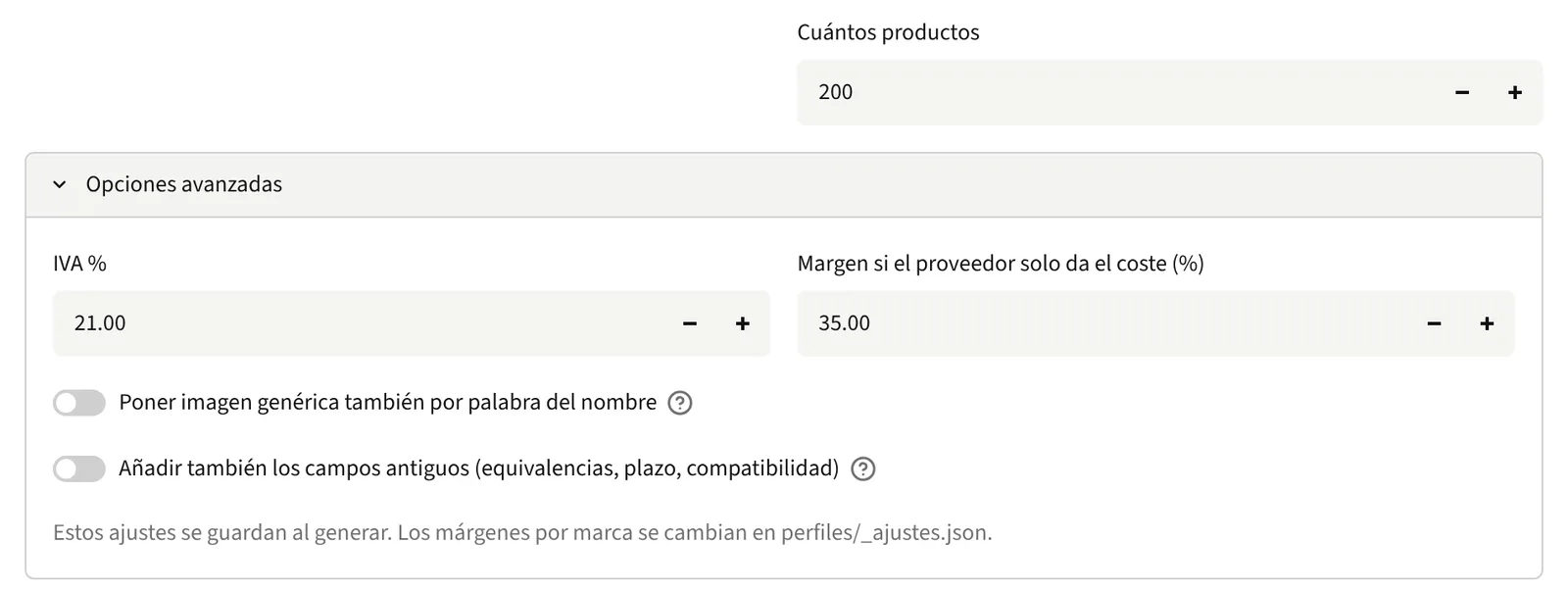
The sample spreads 200 products across part families to test before uploading everything. Image by name is off; VAT and margin are changed here without touching code.
A blank cell in the CSV clears the value in the shop.
Reads the store export, matches by SKU and compares.
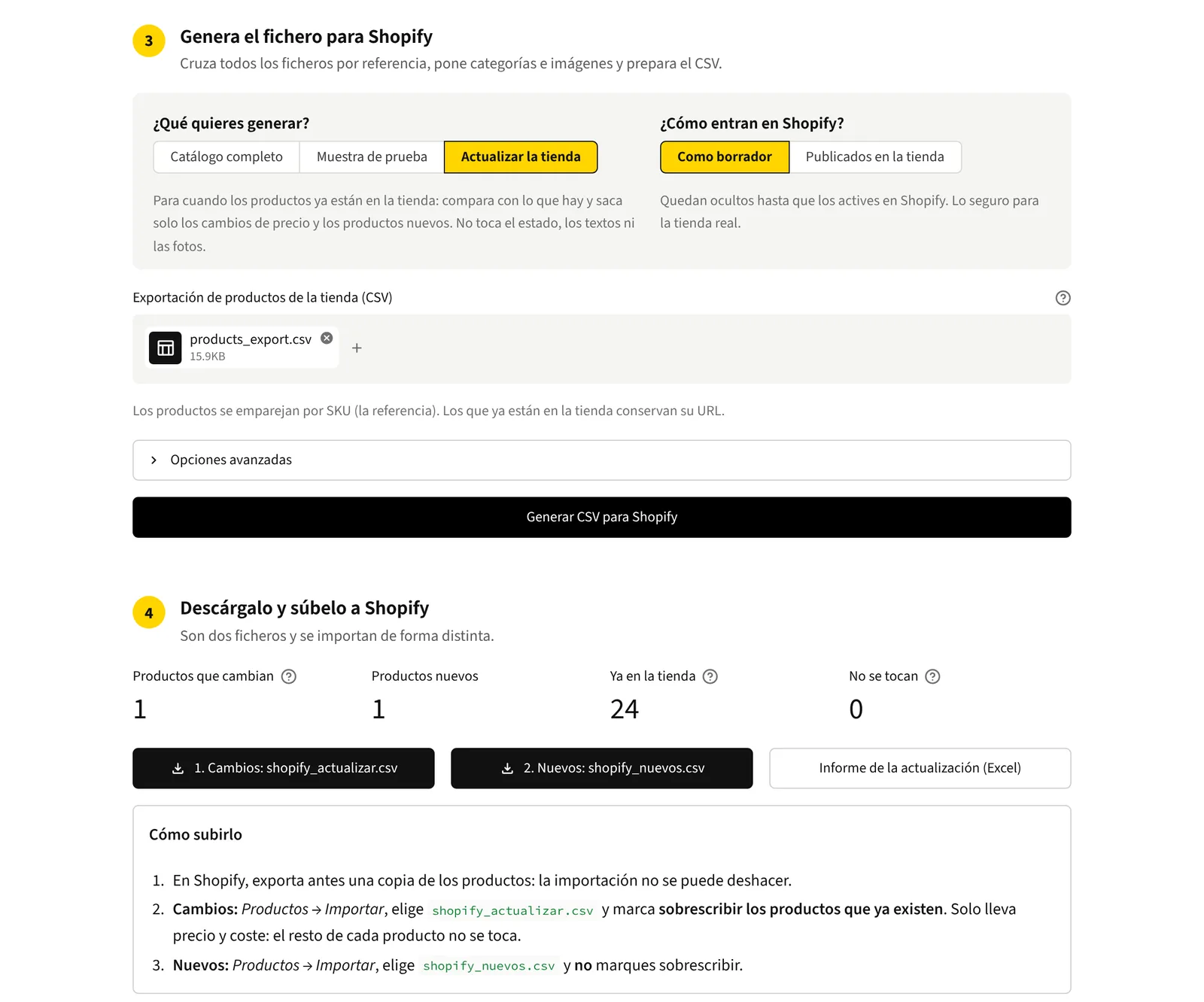
An example export of 24 products, with one old price and one product missing: the tool finds exactly one change and one new product, and explains how each file is imported. The interface is in Spanish, like the people who use it.
/ 05 · Incidents
Most of the features above exist because something went wrong first. Where the cause was not investigated, the table says so.
| Symptom | Cause | Lesson |
|---|---|---|
| Import of ~33,000 products stuck | Not investigated; started again in smaller parts. | Start with a sample. Became the sample mode. |
| ~3,000 imported products invisible | They were not published to the online store channel. | Publishing now goes in the import, as one more column. |
| Hand pumps vanished | "HAND" was translated as "manual", and the filter drops maintenance manuals. | A translation can trip a filter further down the line. Now "de mano". |
| 514 products in "Other" | No rules for bearings, seals, hoses, hydraulic parts or workshop tools. | New rules and a new hydraulics system: down to 177. Rule order matters. |
| 12 products with someone else's photo | Not analysed; found by checking the shop by eye. | Removed and checked one by one: 124 of 188 products with an image, none of the 12. |
| Setup script failed on Windows | The local Python trusted an expired certificate. | Ship the certificate bundle (certifi) with the tool instead of trusting the machine. |
| No way to create the app the old way | Shopify stopped allowing new custom apps in the admin on 1 January 2026. | App built in the Dev Dashboard with client credentials. Each app belongs to its store. |
| "0.206" kg read as 206 kg | A dot followed by three digits was taken as thousands, as in European price lists. | Found in code review before any weights arrived. Each supplier profile now states its decimal format. |
| The filter matched inside words | "RING" also matches "SPRING". | Not changed. Matching whole words would drop 840 products, 420 of them springs. Which parts to sell is a business decision, not a code fix. |
/ 06 · What it proves
| Claim | Evidence |
|---|---|
| Diagnosis before proposing | The brief was a website; the fix was a data process. The 192 against 1,000+ is what decided it. |
| Every exclusion listed | 37,948 products from sources that disagree in format, language and completeness, with every exclusion and conflict listed rather than hidden. |
| Safe for the shop | Dry-run setup, no deletions, no stored credentials, and an update mode that cannot touch status, texts or photos. |
| Every change checked | 37 automated tests, and every change compared product by product against the full catalogue before it was kept. |
| Scales without code changes | Tested with 37,948 products while the shop starts with about a thousand. A new supplier is a format saved once, and categories, images and margins are CSV files. The same process runs a 200-product sample or the whole catalogue. |
| Handed over | A four-step interface, a two-page guide for the people who use it, full documentation, and a private repository with one commit per change. |
The data behind it: what the five sources bring, counted field by field against what Shopify and Google need, is a separate study: What is a supplier catalogue missing for Shopify?
/ Next
If your shop depends on supplier files that do not fit together, email me and we will look at it.