/ TLS/SSL certificates
Check your website's TLS/SSL certificate for free
Your website's TLS certificate (what many of us still call SSL) expires, and sooner every year. From 15 March 2027 it can last 100 days at most, and from 2029, 47. If you renew by hand, that's going from once a year to at least four times, then around eight.
Free and open source, MIT licence. No sign-up, no account, and it runs on your machine: your data goes nowhere.
See how your TLS/SSL certificate is doing, and how to fix what is wrong.
A free, open source, one-command checker. Give it your domain and it tells you how your certificate is doing, what changes for you in 2027 and, if something is wrong, how to fix it.
Why yogurTLS? Because certificates are heading for yogurt-style expiry dates. Not long ago they could last more than a year and you forgot about them; from 2029 they will last 47 days, so you will check the date the way you check the yogurt in the fridge. Hence the logo, a tub with a keyhole on its label. TLS is the protocol that protects the connection between your site and the people visiting it.
How it differs from an online checker
Seeing when a certificate expires is easy: dozens of websites do it. yogurTLS is for people who run one or several sites and want to know before something breaks.
If you only want to look at the date once, you need nothing: click the icon left of the address, then "Connection is secure" and the certificate. The expiry date is there.
- With and without www, at once. Online checkers usually look only at the name you type. On one in four .es sites, each version has a different certificate.
- All your sites at once. A list in a file, and an exit code so a scheduled job (cron) can alert you when something comes out amber or red, without you having to remember to look.
- What 2027 and 2029 mean for your certificate. Not general news, but whether yours already runs at that pace.
- From inside your server. From the outside you cannot see how a certificate is renewed. Run on your server, it tells you whether automatic renewal is set up and whether the certificate was renewed but nobody reloaded the site.
- The reminder in your calendar. If you renew by hand, it leaves the appointment in Google Calendar, Outlook or Apple Calendar.
- Free, no account, nobody selling. Many online checkers belong to companies that sell certificates or services. There is nothing to buy here.
$ npx yogurtls yourdomain.comAll you need is Node 20 or newer. Nothing else to install.
What it checks
- 01Expiry and validity
How many days are left and whether it already runs at the 2027 and 2029 pace.
- 02Full chain
What your browser hides: with the intermediate missing, your site shows a padlock and fails for apps, integrations and bots.
- 03With and without www
Both at once. One in four .es sites uses a different certificate on each.
- 04Name, authority and self-signed
What makes a browser show its error page. As a traffic light: GOOD, WARN or FAIL, always with the word.
What it tells you
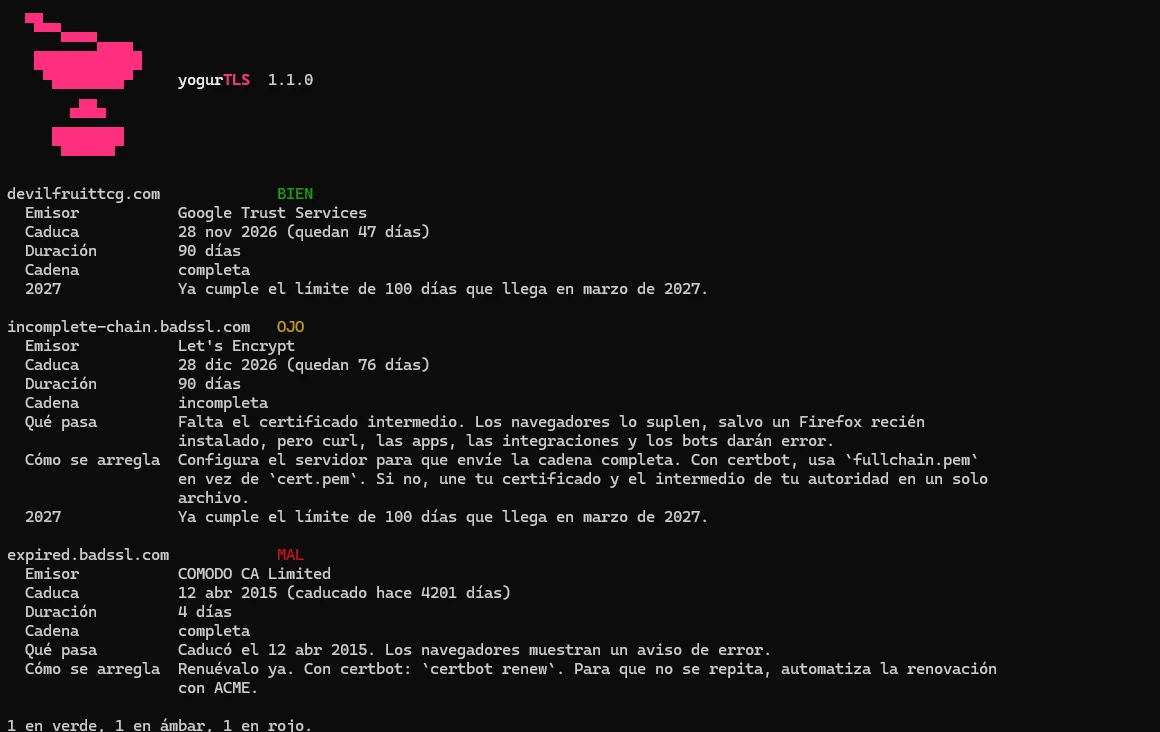
See the output as text
$ npx yogurtls devilfruittcg.com incomplete-chain.badssl.com expired.badssl.com

devilfruittcg.com             BIEN
  Emisor           Google Trust Services
  Caduca           28 nov 2026 (quedan 47 días)
  Duración         90 días
  Cadena           completa
  2027             Ya cumple el límite de 100 días que llega en marzo de 2027.

incomplete-chain.badssl.com   OJO
  Emisor           Let's Encrypt
  Caduca           28 dic 2026 (quedan 76 días)
  Duración         90 días
  Cadena           incompleta
  Qué pasa         Falta el certificado intermedio. Los navegadores lo suplen, salvo un Firefox recién
                   instalado, pero curl, las apps, las integraciones y los bots darán error.
  Cómo se arregla  Configura el servidor para que envíe la cadena completa. Con certbot, usa `fullchain.pem`
                   en vez de `cert.pem`. Si no, une tu certificado y el intermedio de tu autoridad en un solo
                   archivo.
  2027             Ya cumple el límite de 100 días que llega en marzo de 2027.

expired.badssl.com            MAL
  Emisor           COMODO CA Limited
  Caduca           12 abr 2015 (caducado hace 4201 días)
  Duración         4 días
  Cadena           completa
  Qué pasa         Caducó el 12 abr 2015. Los navegadores muestran un aviso de error.
  Cómo se arregla  Renuévalo ya. Con certbot: `certbot renew`. Para que no se repita, automatiza la renovación
                   con ACME.

1 en verde, 1 en ámbar, 1 en rojo.
Real yogurTLS 1.1.0 output from 12 October 2026, on a Windows set to Spanish, so it answers in Spanish. Add --en for English. The days left depend on the day you run it.
npx yogurtls a.com b.comSeveral sites at once.
npx yogurtls --file domains.txtA list in a file, one site per line.
--warn-days 14Amber when expiry is close. Exits 0, 1 or 2 for a scheduled job (cron).
--es --enLanguage. By default, your system's.
npx yogurtlsWith nothing else, it asks for the domain.
It runs on your machine (or on your server, with --server), only connects to the domains you give it and sends nothing to anyone. It renews and installs nothing: it only reads.
On your server: --server
From the outside you cannot see how your certificate is renewed. From the inside, you can look. Run it on the machine that serves the site:
$ sudo npx yogurtls yourdomain.com --serverIt compares the certificate on disk (where certbot or acme.sh keep it) with the one the site sends. If the one on disk is newer, the renewal worked but nobody reloaded the server, and it gives you the command to fix it. It also checks whether automatic renewal is set up: certbot's timer or a scheduled job running certbot or acme.sh. Being set up does not guarantee it works, which is why it also compares the two certificates.
Limits. Linux only. If a CDN such as Cloudflare sits in front, people see the CDN's certificate, so it does not compare them and tells you so. If your certificates live in Docker or a control panel, point to the file with --cert; renewal is then not judged, because the container or the panel does it and it cannot be seen from there.
The reminder in your calendar: --calendar
For people who renew by hand. It saves one reminder per domain 14 days before expiry (change it with --warn-days) to import into Google Calendar, Outlook or Apple Calendar.
$ npx yogurtls yourdomain.com --calendar reminders.ics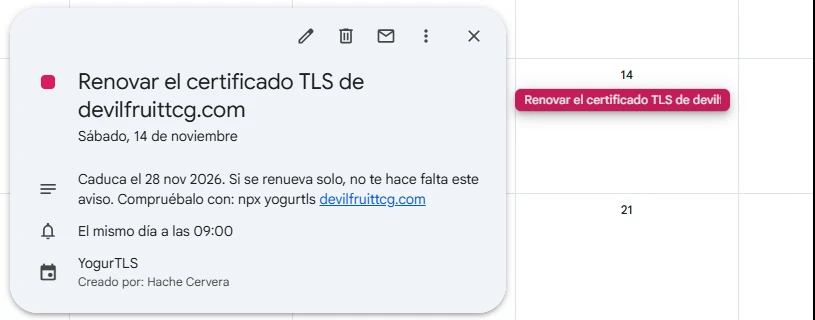
It cannot tell whether your certificate renews on its own, so it says so in the reminder itself. After renewing, run it again.
/ Before it happens
When a TLS/SSL certificate does not renew on its own
With Let's Encrypt and almost any modern host, the certificate renews by itself. But there are cases where it does not, and some are treacherous because nobody notices until the site breaks.
- Bought certificates. If you bought it from a commercial authority (DigiCert, Sectigo…), renewing means buying again, validating, downloading and installing by hand. Common in large companies, public bodies and universities.
- Uploaded by hand. A certificate pasted into a control panel, a CDN or a load balancer does not renew: that system did not issue it and cannot ask for another.
- The automatic renewal broke. The certbot scheduled job stopped after a server move, the domain now points somewhere else (a new CDN, another server), port 80 is closed, or the DNS API key expired. It all looked automatic, and from that day on it is not.
- It renews, but the server never finds out. The classic: certbot saves the new certificate to disk, but Nginx or Apache keep sending the old one until someone reloads them. On disk everything is fine, and the site expires anyway.
- Several servers. Behind a load balancer, the certificate renews on one and not on the others.
And note: Let's Encrypt stopped sending its "your certificate expires soon" email in June 2025. If that was your only alarm, you no longer have it.
/ If it already happened
What happens when it expires, and how to recover
An expired certificate does not switch your site off, but it is close: the browser stands in front of it with a full-screen warning.
- In the browser. Chrome shows "Your connection is not private" (
NET::ERR_CERT_DATE_INVALID) and almost everyone leaves. If your site uses HSTS, there is not even a button to continue. - Outside the browser, silently. Apps, APIs, integrations, your payment provider's notifications and webhooks fail without showing any screen. That is often what costs the most money, because nobody sees it.
- In trust. If your visitors learn to click through the warning on your site, they will do it on a fake one too.
If it has expired, in this order
- Find out why it did not renew. If it was automatic, fix the cause first. With certbot,
sudo certbot renew --dry-runshows the error without using up attempts: Let's Encrypt only gives you 5 identical certificates every 7 days and 5 failed validations per hour, so retrying blindly can lock you out for days. - Renew it. With certbot,
sudo certbot renew. On a hosting plan, "reissue SSL certificate" in the control panel is usually enough. - Reload the server so it uses the new one:
sudo systemctl reload nginx(orapache2). If there is a CDN or load balancer in front, upload it there too. - If it was a bought certificate and the renewal will take time (business certificates, OV or EV, need the company validated and can take days), put up a free Let's Encrypt one in the meantime. It encrypts just the same, and your site is back in minutes.
- Check it outside the browser, with and without www and with the full chain:
npx yogurtls yourdomain.com. As soon as the server sends the new certificate, the warning goes away for everyone. - Recover what failed silently. Check payment notifications and webhooks from those hours: many providers only retry a few times.
- Set an alarm so it does not happen again:
npx yogurtls yourdomain.com --warn-days 14in a scheduled job (cron), or the reminder in your calendar with--calendar reminders.ics.
/ Security
What's worth knowing about security
- The padlock does not mean the site can be trusted. It only says the connection is encrypted and whoever serves it controls that domain. Phishing sites have a padlock too, for free.
- Free is not less secure. A Let's Encrypt certificate encrypts exactly like a paid one. Business certificates (OV or EV) add details of who is behind the site, not more encryption.
- Never "fix" it by turning verification off. When an integration fails because of the certificate, the temptation is
curl -k,verify=Falseor similar. That lets anyone sit in the middle and read or change the data. The fix belongs on the server, not on whoever connects to it. - The private key is what really protects you. Only the server should be able to read it, and never by email or in a repository. If it leaks, revoke the certificate and get a new one with a new key. It is one of the reasons certificates keep getting shorter: revoking a stolen one works poorly, so it is better if it expires soon.
- Decide who can issue certificates for your domain. A CAA record in your DNS says which authorities may do it, and authorities are required to respect it. It is free and takes a minute at your DNS provider.
- Every certificate is public. Each certificate for your domain is recorded in public logs (Certificate Transparency), with all its names. You can look yours up on crt.sh and see whether someone got one you did not ask for. And do not put the name of an internal subdomain you want to keep quiet in a public certificate.
/ How to fix it
How to renew your TLS/SSL certificate without having to remember
Renewing by hand is like renewing a passport: forget it and you are stuck. What you want is the new one arriving by post. This gets you there, and all of it is free.
| Step | How |
|---|---|
| Automate renewal | With ACME, the protocol Let's Encrypt uses: certbot or acme.sh on your server, or your host or CDN if they already do it. At 47 days, renewing by hand stops being an option. |
| Send the full chain | Your server has to send your certificate and the intermediate. With certbot, use fullchain.pem instead of cert.pem. |
| Check it outside the browser | With yogurTLS, or with openssl s_client -connect yourdomain.com:443 -servername yourdomain.com, which should end in Verify return code: 0 (ok) (OpenSSL does not come with Windows; Git for Windows includes it, in Git Bash). Without installing anything, SSL Labs flags an incomplete chain as "Chain issues: Incomplete". |
| Watch the expiry date | Even when automated, because automation fails too. npx yogurtls yourdomain.com --warn-days 14 in a scheduled job (cron) can alert you in time. |
| Check every version | With www, without it, and any subdomain still in DNS. |
/ The study
How the 1,000 most visited .es sites are doing
I measured the TLS certificates of the 1,000 most visited .es domains on the Tranco list, all on 9 October 2026. 958 could be measured.
/ 01 / The basics
What a TLS/SSL certificate is, assuming nothing
When you open a site over https://, two things happen. What you send travels in a sealed envelope only that site can open. And the site shows a certificate, its ID card, to prove it is who it claims to be. A certificate authority signs it (Let's Encrypt, DigiCert, Google, Spain's FNMT…) after checking that whoever asks for it controls the domain.
Browsers ship with a list of authorities they trust, like someone who knows by heart which official stamps are real. But authorities keep their master stamp locked away and sign with an intermediate certificate. So a site has to show its ID card and also the credentials of the office that issued it. If those credentials are missing, the chain is incomplete.
TLS or SSL? The same thing, for what matters to you. SSL is the name of the old protocol, retired years ago as insecure; TLS is the one in use today. But almost everyone, me included, still says "SSL certificate", and hosting companies still call it that.
Why do they expire? In case someone steals the key. Revoking a stolen certificate works poorly in practice, so the best defence is a short life.
/ 02 / What changes
What changes in 2027 and 2029
Browsers and certificate authorities decide this together at the CA/B Forum. The maximum counts from the day a certificate is issued, not from its expiry. It's going from an ID card to a yogurt.
| Issued from | Maximum validity | If you renew by hand |
|---|---|---|
| Before 15 Mar 2026 | 398 days | once a year |
| 15 Mar 2026 | 200 days | twice a year |
| 15 Mar 2027 | 100 days | at least 4 times a year |
| 15 Mar 2029 | 47 days | around 8 times a year |
/ 03 / Results
How long .es TLS certificates last today
Validity of the certificate each site serves, measured at the final destination of the home page after following redirects. One row per domain.
| Validity | Domains | % of 958 | What it means |
|---|---|---|---|
| 47 days or less | 19 | 2.0% | already within the 2029 limit |
| 48 to 100 days | 402 | 42.0% | already within the 2027 limit |
| 101 to 200 days | 336 | 35.1% | will have to renew twice as often |
| Over 200 days | 201 | 21.0% | from renewing once a year to at least 4 times |
| Group | Domains | Detail |
|---|---|---|
| Error in Chrome | 21 | 15 with a certificate that does not cover their name, 4 with an incomplete chain plus another fault, 2 expired (since 2021 and 2023) |
| Load in the browser, fail outside | 12 | 11 with an incomplete chain and 1 whose chain OpenSSL does not validate |
| Not a certificate fault | 1 | HTTP/2 protocol error |
No certificate longer than 200 days was issued after 15 March 2026. All 958 follow the rule, which also works as a check that the measurement adds up.
/ 04 / Findings
What's worth knowing about your TLS certificate
- Your browser covers the gap. 11 sites are missing their intermediate certificate. Chrome downloads it on the spot and Firefox takes it from a list it keeps updated, so both show the padlock. curl, apps, business integrations and bots do neither, and for them the site fails. You open your site, see the padlock and assume all is well.
- A fresh Firefox does fail. With a brand new profile, without that list, 10 of the 11 failed (
SEC_ERROR_UNKNOWN_ISSUER). With a profile synced for 16 minutes, all 11 loaded. That's the control group: the list is what saves Firefox. - The Greek authority behind Spanish universities. 70 .es domains carry certificates from HARICA, the Greek academic network's authority. Since January 2025 HARICA runs the certificate service of GÉANT, the European research network, and RedIRIS offers it in Spain. By domain name they are universities (47), public bodies (11) and research centres (10); I checked 15 at random by hand and 13 matched. If you work at a university, this rule hits you directly.
- The sites already on the 2029 pace didn't choose it. All 19 certificates of 47 days or less last exactly 30 days, and 17 come from Certainly, Fastly's authority, which only works with its CDN and renews every 20 days. If your CDN or host renews for you, the 2027 change won't touch you.
- Two certificates per site. On 226 of 847 domains (26.7%), the
wwwand non-wwwversions use different certificates. Not a fault, but two things to renew.
/ 05 / What can't be measured
Who renews by hand is invisible from outside
I tried to tell which sites renew by hand using the public certificate history (Certificate Transparency, queried through crt.sh), on a random subsample of 100 domains, with thresholds fixed before looking at results.
It didn't work. Large sites hold dozens of certificates at once, crt.sh misses wildcard and multi-domain certificates, and even Let's Encrypt, which renews on its own by design, came out as "manual". If a method gets wrong what you know for sure, you can't trust the rest, so I dropped it without publishing a figure.
That's why 48.4% is the share of sites whose issuer renews on its own, not measured renewals. I tried again in yogurTLS, on 150 sites from the study, and it only reached a conclusion for 9% of those known to renew automatically. That's why yogurTLS does not infer it from the outside. What it does is look from the inside, with --server, on your own machine.
/ 06 / Method
How it was measured, and its limits
- Sample. The first 1,000 domains ending in
.eson Tranco list K9Z7W. It starts at rank 724, because many large Spanish sites use.com: this is the most visited .es web, not the whole Spanish web. - Unit. The domain, measured at the home page's final destination after redirects (949 of 1,000; the other 51 at the default host).
- Connection. One normal TLS handshake per host, like any browser. No path or port scanning.
- Errors. Every invalid certificate was measured again and opened in a real Chrome to confirm the cause. The 11 incomplete chains were also tested in Firefox, with a fresh profile and a synced one.
- No secure connection. 42 domains: 8 sites (living at another address or only unencrypted), 9 technical domains, classified by name, and 25 with no visible site.
- Limits. One network location, one day: a CDN may serve a different certificate depending on where you connect from. Two sites fixed their certificate the next day; they count as they were on the 9th.
- No names. Neither this page nor the downloadable data names any site with a broken certificate.
Sources: CA/B Forum, Baseline Requirements, Tranco list K9Z7W, GÉANT Trusted Certificate Service, RedIRIS, TCS authorities, Fastly, Certainly and RFC 8555, ACME.
/ Try it
Did something come up red?
Run yogurTLS on your site. If something is unclear, breaks or a check is missing, open an issue on GitHub or email me.